


Some of your best content is quietly outperforming the rest, you just have to know where to look. Your top posts live both on your blog and across your social media profiles, and finding them is the first step to making more of what already works. Here’s how to track down your best-performing posts on every platform, and what to do once you find them.
Why it’s worth finding your best-performing posts
When you know which posts are winning, you stop guessing. Your top-performing content is a roadmap for your content strategy: it shows you the topics, formats, and themes your audience already loves, so you can plan future content around proven winners instead of starting from scratch. It also helps you spot trends, the types of content that keep showing up at the top, so you can lean into them. Knowing your best posts saves you time and energy too, you can stop pouring effort into formats that quietly flop and double down on the ones your audience actually shows up for.
Find your best blog posts in Google Analytics
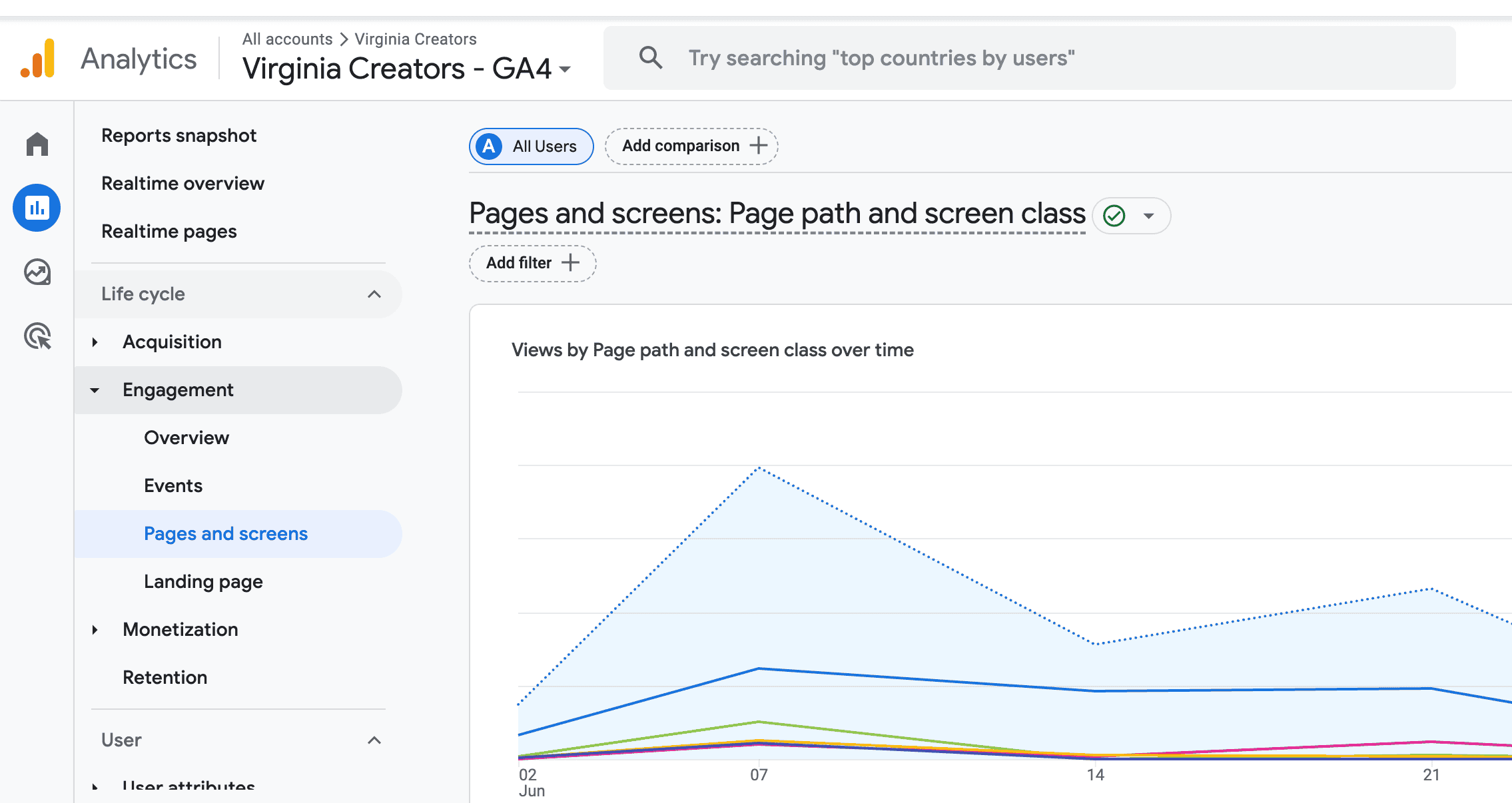
If you’re looking for your top blog posts, Google Analytics is the place to start. (Note: the old Universal Analytics menus are gone, so these are the current GA4 steps.) In GA4, go to Reports in the left menu, click Engagement, then choose Pages and screens. By default the report sorts by Views, so your top-performing content sits right at the top at a glance. You can change the date range in the top corner to look at the last month, or a longer stretch, and check key metrics like views, average engagement time, and key events to see which posts truly hold attention rather than just collecting clicks. If a post gets lots of views but very little engagement time, make a note, it might be pulling clicks without keeping anyone around.
Once you can see your top posts, take a look at 3–5 of your most popular ones and ask yourself:
- Are these posts driving most of the traffic to your site?
- Are they similar to each other? Any consistent theme?
- Could you create more content like your best performers?
- Do you have related posts to send those readers to next?
Find your top posts on social media
Your social profiles have built-in insights too, and each platform makes it easy to spot your successful posts.
Instagram: You’ll need a professional account (a Business or Creator account, both free) to unlock Insights. Open the Professional dashboard under your bio, tap Insights, then look at “Content you’ve shared.” Sort by reach, saves, or profile visits to see your top posts, and watch engagement rate and interactions to learn which captions and video content (like Reels) connect best. Insights also shows new followers, so you can tie follower growth back to specific posts. (Heads up: Instagram only keeps about 90 days of data.)
Facebook: For Facebook Pages, open the Professional dashboard or Insights to see your top posts ranked by reach and engagement; a personal Facebook profile won’t show the same analytics, which is one more reason to run a Page for your blog or business. You can filter by the last month or a custom range to spot what performed best recently.
LinkedIn: Head to the Analytics tab on your profile or page to see which posts earned the most impressions, reactions, and comments. LinkedIn is great for spotting which professional topics resonate, so you can write more posts in that lane.
TikTok: Switch to a free Creator or Business account, then open Analytics to find your top videos by views, watch time, and shares. The trends and sounds behind your best videos are often worth revisiting in future content.
Which metrics actually matter?
It’s easy to get lost in the numbers, so focus on a few key metrics rather than all of them. Views and pageviews tell you what’s getting found, but engagement metrics tell you what’s actually landing. On your blog, average engagement time shows whether people stick around. On social media, engagement rate (interactions divided by reach or followers) is usually more telling than raw likes, because it accounts for how many people saw the post in the first place. Pay attention to saves and shares too, when someone saves a post or sends it to a friend, that’s a strong signal the content was genuinely useful. Clicks matter most when your goal is sending people somewhere, like a new blog post or a product. Pick the one or two metrics that match your goal and judge your top posts by those.
See everything in one place with a social media tool
If you post across several platforms, checking each one gets old fast. Social media management tools like Hootsuite and Sprout Social pull your content performance from every connected profile into a single dashboard, so you can compare engagement metrics across platforms at a glance and even export a report. Many of these tools also suggest the best times to post and let you reschedule your top-performing content, so a single winning post can keep working for you long after you first hit publish.
What to do with your best-performing posts
Finding your top posts is only useful if you act on it. Look for what your winners have in common, the content type, the topics, the type of post, and make more of it. Update older successful posts to keep them fresh, and repurpose the big ones. A single high-performing blog post can become an email, a carousel, a short video, and a pin, each one reaching a slightly different corner of your audience. Let your best performers shape your future content, because paying attention to what already works is one of the simplest ways to grow.
How often should you check your top posts?
You don’t need to obsess over your analytics every day. For most creators, a quick weekly check-in is plenty, or you can just look back at the last month, note your top few posts on each platform, and jot down any patterns you see. Set a recurring reminder so it actually happens, and once a quarter, zoom out to spot the bigger trends shaping your content. A little consistency here beats a once-a-year deep dive.
You don’t need fancy tools to figure out what’s resonating, just a few minutes in your analytics and a willingness to follow the data. Once you know your best-performing posts, you can create more of what your audience already loves. If you have questions, leave them in the comments below!